Support a Streamer and Twitch Drops Now Live!


Earn the Fishmonger May pet by supporting your favorite World of Warcraft channels with the gift of 2 subscriptions on Twitch and collect the Cuddly Alliance Blue Grrgle and Cuddly Horde Red Grrgle plushies* Housing decor items by watching your favorite World of Warcraft Twitch channels when World of Warcraft: Midnight goes live.
Support a Streamer on Twitch and Earn the Fishmonger May Pet
World of Warcraft is partnering with Twitch to host Support a Streamer during the launch of World of Warcraft: Midnight! Twitch viewers will be rewarded for gifting a total of 2 subscriptions to across any eligible streamers who are Twitch Partners or Twitch Affiliates while the streamers are live streaming World of Warcraft with the channel category set to “World of Warcraft.” The campaign runs from. February 26 at 3:00 p.m. PST until March 26 at 3:00 p.m. PDT and is available in all regions where World of Warcraft and Twitch are accessible. Support your favorite, eligible streamers and you can receive the Fishmonger pet to join you in your adventures.
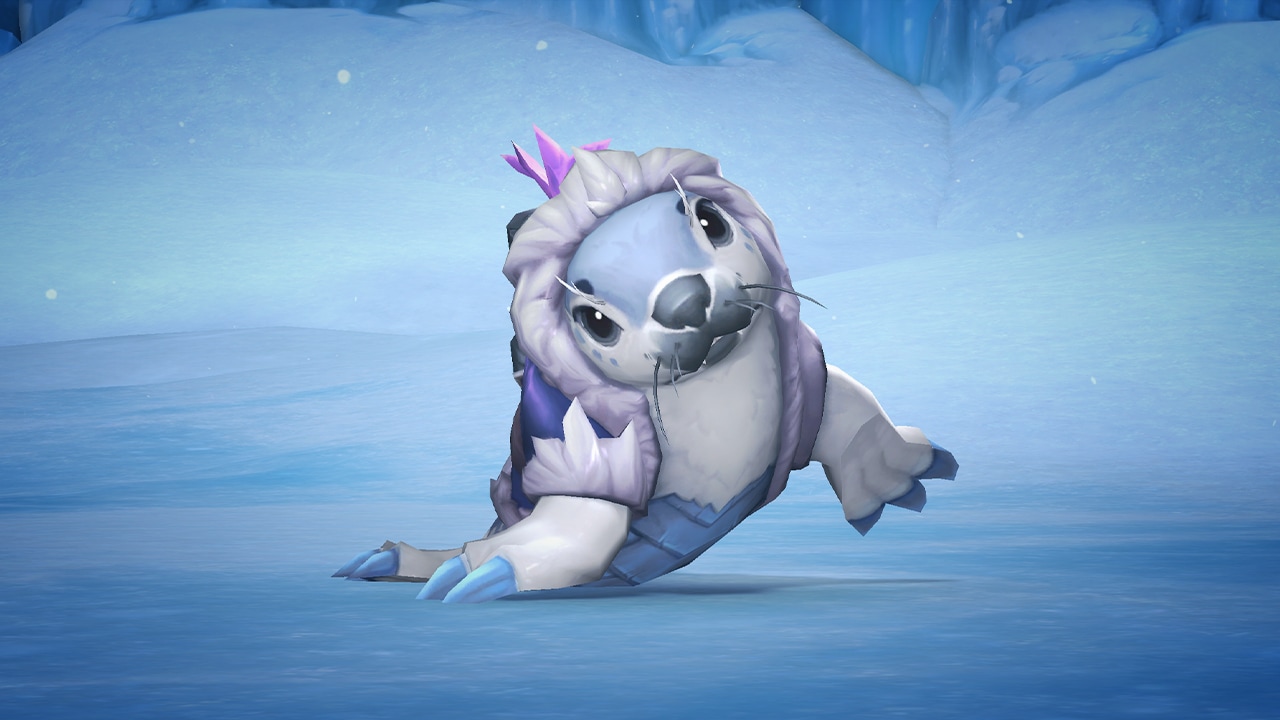
“You can never have too many fish according to May.”
Event Duration
Start Time: February 26, 3:00 p.m. PST
End Time: March 26, 3:00 p.m. PDT.
How to Participate
- Log in to your Twitch account (if necessary, first create a Twitch account for free at Twitch.tv).
- Visit any eligible Twitch channel streaming World of Warcraft.
- While the channel is live streaming World of Warcraft, purchase and gift at least one subscription of any tier; once you’ve purchased and gifted a cumulative total of two subscriptions during the campaign period, you’ll earn the reward.
* Please note that the campaign will begin on February 26, 2026, at 3:00 p.m. (PST). Any subscriptions purchased before the above start time will NOT be counted towards the campaign. Any subscriptions purchased while the channel is not live streaming World of Warcraft with the category set to “World of Warcraft” also will NOT be counting towards the campaign.
Frequently Asked Questions
Q. Which regions are participating in the Support a Streamer reward campaigns?
A. Anywhere World of Warcraft & Twitch are available.
Q. How can I confirm which channels are eligible for the campaign?
A. Open to all Twitch Partners & Affiliates broadcasting World of Warcraft gameplay.
Q. How do I purchase a subscription on Twitch?
A. Users must first log into Twitch, using either a web browser or mobile device. Purchases may be made on either a web browser or mobile device. Detailed information on purchasing subscriptions can be found here, and information on purchasing gift subscriptions can be found here.
Q. How many subscriptions do I need to purchase to earn the Fishmonger May Pet for World of Warcraft? Which Tier(s) are eligible for the campaign?
A. To qualify for the reward, users must purchase and gift a cumulative total of two subscriptions of any tier. Each subscription must be purchased and gifted during the campaign period. Prime Subs are excluded.
Q. I purchased two subscriptions prior to the campaign. Am I eligible for the reward?
A. No. The reward can only be earned by purchasing two subscriptions to a stream that is streaming World of Warcraft and using the World of Warcraft category during the campaign period.
Q. What should I do if I have a problem completing subscription purchases on Twitch?
A. First, make sure that you are trying to complete a purchase in one of the channels of the World of Warcraft Category. Most commonly, refreshing the page, or trying a different payment method can help. For mobile purchases, please allow a moment to refresh. If you require further assistance, contact the Twitch Support team by reading common troubleshooting FAQs and common fixes here.
Q. Can I track how many eligible subscriptions I have done for the campaign?
A. While there is not a centralized location to track progress in the campaign, users may refer to their Twitch Payment History to review recent purchases of subscriptions to eligible channels. This should be used only as a reference for successful subscription purchases and does not guarantee the subscriptions qualified for the campaign.
Q. Where can I find my campaign rewards once I've earned them?
A. To receive your rewards, you must claim the drop on the channel you’re watching or in the Drops Inventory menu on Twitch.
Offers applicable with purchase of two gift subscriptions or recurring subscriptions of any tier on eligible channels live streaming ‘World of Warcraft’ category. Offer not available where World of Warcraft is not available for sale. Twitch reserves the right to modify or cancel this offer at any time. Offer is non-transferable, may not be resold, and may only be redeemed once per user. Offer will be invalid if you violate any of these terms. Subscriptions are subject to the Twitch Terms of Sale. Please visit help.twitch.tv for questions or support regarding receipt of reward.
Twitch Drop: Cuddly Alliance Blue Grrgle and Cuddly Horde Red Grrgle Plushies
Greetings, adventurers! With the release of the World of Warcraft®: Midnight™ players return to the elven kingdom of Quel'Thalas as Xal’atath’s invasion of Azeroth begins, and the Voidstorm threatens to cover the world in darkness. Watch any World of Warcraft stream on Twitch.tv from February 26, 3:00 p.m. PST, until March 26, 3:00 p.m. PDT to earn the Cuddly Alliance Blue Grrgle and Cuddly Horde Red Grrgle plushies* Housing decor items.
Eligibility
To participate, you must link your Twitch account by visiting https://account.battle.net/connections. If you have changed your password or made any changes to your Twitch or Battle.net account, you will have to relink your accounts. When you relink, there will be a 7-day cooldown before you can relink a new Twitch account. After you’ve claimed your rewards on Twitch, please make sure you’re logging into the Battle.net region you’d like to receive the drop(s) on, as the first region you log into will be where your items will be delivered. It can take up to 24 hours to receive your reward(s) in game after claiming. Read our Frequently Asked Questions section for more information.
How do I Earn Twitch Drops?
Start Time: February 26, 3:00 p.m. PST
End Time: March 26, 3:00 p.m. PDT
Watch 4 hours of World of Warcraft content while these Twitch Drops are active on any channel to earn the Cuddly Alliance Blue Grrgle and Cuddly Horde Red Grrgle plushies Housing decor items.
Frequently Asked Questions
Q. How do I link my battle.net and Twitch accounts?
A. Sign into your Battle.net account at https://account.battle.net/connections and click the Connect link for Twitch, then follow the instructions to sign in and link your Twitch account to Battle.net.
Q. What devices can I use to earn and claim drops?
A. You can earn and claim drops using your PC/Mac web browser or on the Twitch app for Android or iOS. Twitch apps on game consoles, smart TVs, and other TV apps do not support drops.
Q. Do I need to watch the same channel the entire time to earn my drops?
A. You can earn progress towards a drop on any eligible channel in the World of Warcraft category on Twitch. You can, for example, watch half an hour on one channel and then switch to another channel without losing your progress. You cannot earn progress faster by watching more than one channel at a time.
Q. Will I receive my drop rewards in-game automatically?
A. To receive your rewards, you must claim the drop on the channel you’re watching or in the Drops Inventory menu on Twitch.
Q. Do Twitch Drop rewards expire?
A. Earned Twitch Drop rewards will expire seven (7) days after they’ve been claimed if a Battle.net account has not been linked.
Q. As a streamer, how do I get Twitch Drops on my channel?
A. All you need to do is ensure your Twitch and Battle.net accounts are linked and that you’ve opted into Drops (see Drops Streamer Home).
Q. What regions are eligible for these Twitch Drops?
A. Participating regions include North America, Latin America, Europe, The Middle East, Africa, Japan, Taiwan, Southeast Asia, Australia, and New Zealand.
We’ll see you on Twitch!
Blizzard has the right to change, pause, or cancel these Twitch Drops and their terms if they cannot run as planned for any reason, including but not limited to technical issues or unexpected factors beyond Blizzard’s control.
*Not available in World of Warcraft Classic® games. Requires World of Warcraft® Subscription or Game Time.Use and placement of decor items is limited to the Housing feature, which requires access to World of Warcraft®: Midnight.
